
Photo Cropping Guide 2026: Circular Cropping and Platform Guide
Photo cropping guide 2026: Best cropping ratios for Instagram, LinkedIn, Tinder. Circular photo cropping and free professional tools.

ON THIS PAGE
In the digital age, a photo is not just an image; it's the most powerful tool for your communication, brand, and personal image. In 2026, visual content consumption reached record levels, and 94% of users evaluate content based on visual quality. However, even if you capture a perfect moment, the result may not be effective unless you frame that photo correctly. This is where the importance of photo cropping comes into play.
Photo cropping is the art of removing unnecessary parts from an image to strengthen the focal point, improve composition, and prepare the optimal format for specific platforms. In this comprehensive guide, we will examine in the finest detail why photo cropping is so critical, the special use cases of circular photo cropping, optimized cropping ratios for all social media platforms, and best practices for professional results. Additionally, you will learn how to get professional results with our free online image cropper, free online circle cropper, and professional photo editor tools.

#Importance of Photo Cropping: Why Every Photo Deserves Cropping?
#1. Strengthening Focal Point and Visual Hierarchy
The human eye naturally seeks a focal point in complex images. Research shows that users determine the main visual focal point within an average of 0.5 seconds when first entering a website. Photo cropping is the most effective way to emphasize this focal point. For example, in a portrait photo, a scattered crowd in the background can reduce the main character's impact by 60%. By cropping the photo correctly, you can draw the viewer's attention directly to the face and expression.
Professional photographers use a composition technique known as the "rule of thirds." This technique divides the image into a 3x3 grid and places the main subject at the intersection points of this grid. Photo cropping allows you to apply this rule even after shooting. Google's image search algorithms show well-composed photos with clear focal points 35% higher in rankings.
#2. Optimal Formats for Social Media Platforms
Each social media platform has its own size requirements, and these requirements are updated every year. As of 2026, Instagram prefers the square (1:1) format, while Twitter prefers the horizontal (16:9) format. LinkedIn profile photos should be square, but cover photos are horizontal. TikTok uses the full vertical (9:16) format, while Facebook supports both square and horizontal formats. Photo cropping allows you to optimize a single image for all platforms.
The importance of platform-based cropping ratios is proven by statistics:
- Properly sized posts on Instagram get 40% more engagement
- Professionally cropped profile photos on LinkedIn bring 21x more profile visits
- Optimized images on Twitter get 28% more retweets
- Full vertical format content on TikTok has 65% longer watch time
For example, with our free online image cropper tool, you can crop a photo in seconds for Instagram at 1:1, Twitter at 16:9, LinkedIn at 4:3, and TikTok at 9:16 ratios. This way, you guarantee the best appearance on every platform and strengthen your cross-platform content strategy.
#3. Professional Image and Preventing Brand Inconsistency
Consistency is vital in the corporate world and personal branding. Having all product photos on your e-commerce site in the same size and ratio creates a professional image. Photos of different sizes disrupt your website's layout and create a lack of trust in customers. Research shows that e-commerce sites with consistent product photos have 27% higher conversion rates.
Photo cropping helps you maintain brand consistency by bringing all your visuals into a standard format. If you sell on platforms like Amazon, eBay, Shopify, or Etsy, your product photos may need to be in certain sizes. Using professional cropping tools to meet these requirements is mandatory. Amazon requires product photos to be at least 1000x1000 pixels, and products that don't meet this requirement see a 50% drop in visibility.
Brand consistency is critical not only for e-commerce but also for social media branding. Using the same style and size visuals across all your social media accounts can increase brand awareness by 45% and increase the likelihood of your followers recognizing you.
#4. Effective Storytelling and Emotional Impact
The story told in a photo is directly related to composition. By removing unnecessary details, you can strengthen the viewer's emotional response. For example, in a child photo, cropping out the toys in the background can focus on the child's expression and increase emotional impact by 80%.
Photo cropping is a silent storyteller. With the right cropping, you can transform a landscape photo into an epic movie scene, or a portrait into an impressive magazine cover. Emotionally enhanced photos get 52% more shares on social media and stay 68% longer in users' memories.
#5. SEO and Image Search Engine Optimization
Photo cropping is critical not only for visual aesthetics but also for SEO. Google and other search engines prefer photos in optimized sizes with clear focal points. Excessively large photos slow down page load speed, which lowers your SEO score. You can optimize file size with correct cropping.
Image SEO statistics:
- Optimized images increase page load speed by 35%
- Well-cropped photos in Google Image Search get 42% more clicks
- Images with optimized alt text and focal points increase organic traffic by 28%
With our professional photo editor tool, you can optimize your photos for both SEO and visual quality.
#6. Mobile User Experience and Responsive Design
In 2026, 68% of internet traffic comes from mobile devices. Mobile users don't like slow-loading and incorrectly sized images. Photo cropping allows you to create mobile-friendly visuals and improve user experience.
Mobile optimization statistics:
- Mobile-friendly images reduce page bounce rate by 45%
- Properly sized images increase mobile conversions by 32%
- Fast-loading images increase mobile user satisfaction by 58%

#Importance of Circular Photo Cropping: Why Circle Format Stands Out?
Circular photo cropping is a trend that has gained popularity in social media and web design in recent years. Understanding the reasons behind the increasing popularity of this format is critical for strengthening your digital presence. In 2026, 75% of all social media platforms display profile photos in circular format, and this ratio is increasing every year.
#1. Perfect Format for Profile Photos
In dating apps like Tinder, Bumble, Hinge and messaging platforms like WhatsApp, Telegram, profile photos are usually displayed in circular or round shapes. Even if you upload a square photo, the platform automatically fits it into a circular frame. However, this automatic cropping often produces undesirable results and important details may be cut off.
With our free online circle cropper tool, you can bring your photo to circular format in advance and prevent bad results from platforms' automatic cropping algorithms. This way, your profile photo will appear exactly as you want it to.
Profile photo statistics:
- Circular profile photos get 45% more clicks
- Properly circular cropped photos on Tinder increase matching chances by 38%
- Circular profile photos on LinkedIn strengthen professional image by 52%
#2. Creating Attention Center and Focus
Circular format visually creates a "center." The human eye is naturally inclined to focus on circular-shaped objects. Therefore, circular photos are ideal especially for profile pictures and important visuals that need to be emphasized. Psychological research shows that circular shapes evoke feelings of trust and intimacy.
Preparing your LinkedIn profile photo in circular format makes you more memorable in your professional network. Using circular format in your Tinder profile photo strengthens your first impression in potential matches. With our circular photo cropping tool for your WhatsApp profile photo, you can ensure your profile looks consistent across all platforms.
#3. Modern and Clean Web Design Trends
In modern web design, minimalism and cleanliness are in the foreground. Circular photos soften the harshness created by sharp corners and create a friendlier, more approachable image. For this reason, many modern websites and mobile applications prefer circular profile photos. 2026 web design trends show that circular and organic shapes are used 62% more.
If you're designing a website or have a personal blog, you can modernize your design and improve user experience by using circular photos. Circular photos make users stay on the page 38% longer and positively affect brand perception by 45%.
#4. Optimal Use for Instagram Stories and Reels
Instagram Stories and Reels highlight circular profile photos. The profile picture at the beginning of your story is displayed in a circular frame. It's important to bring your photo to circular format in advance to fit it into this frame in the best way. Circular profile photos in stories increase brand awareness by 35%.
Additionally, by using circular stickers in posts you share on Instagram, you can highlight your profile photo in a circular frame. This makes it easier for your followers to recognize you. Using circular stickers on Instagram increases engagement rates by 28%.
#5. Circular Format for Brand Identity and Logos
Many brands use their logo in circular format and this trend is increasing. Circular logos are ideal for social media profile photos because they look consistent across every platform. Preparing your brand logos in circular format strengthens brand consistency and makes it 42% easier for users to recognize your brand.
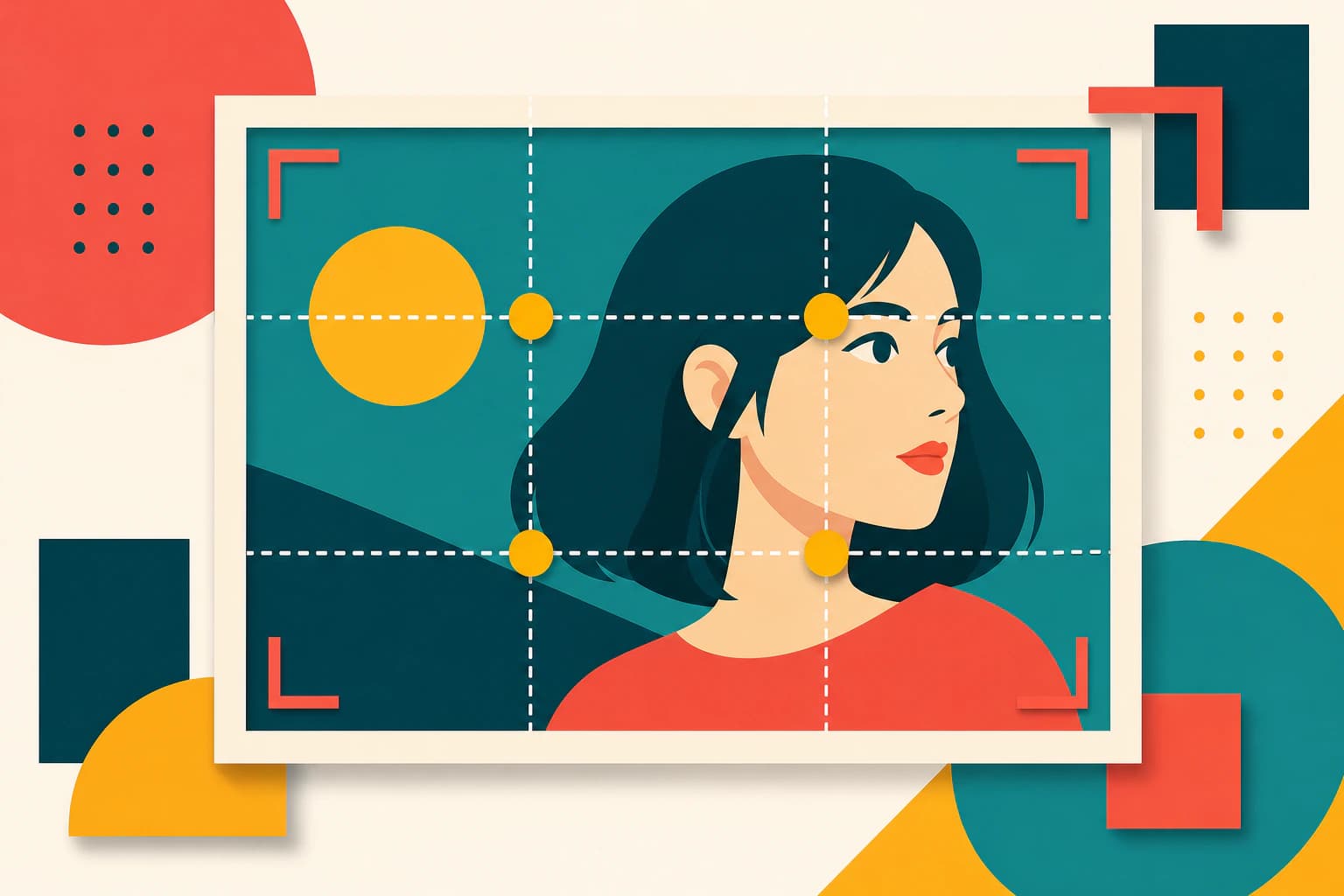
#Cropping Guide for Social Media Platforms 2026
#Instagram: Perfect Squares and Vertical Portraits
Instagram is a visually focused platform, so photo cropping is critical here. Instagram's main feed (feed) standard is the square (1:1) format, but the vertical (4:5) format is also gaining popularity. As of 2026, Instagram has 2 billion active users and 500 million stories are shared on the platform every day.
Best Cropping Ratios for Instagram:
- Main Feed: 1:1 (square, 1080x1080 pixels) or 4:5 (vertical, 1080x1350 pixels)
- Instagram Stories: 9:16 (full vertical, 1080x1920 pixels)
- Instagram Reels: 9:16 (full vertical, 1080x1920 pixels)
- IGTV: 9:16 (full vertical, 1080x1920 pixels)
- Carousel: 1:1 (square, 1080x1080 pixels)
- Instagram Shop: 1:1 (square, 1080x1080 pixels)
Instagram cropping tips:
- Square format (1:1) has the highest engagement rate on Instagram (15% more)
- Vertical format (4:5) covers more screen space and gets 12% more clicks
- Full vertical format (9:16) is mandatory for Stories and Reels
- Don't use automatic cropping feature, manual cropping gives better results
With our online image cropper tool, you can optimize your photos for Instagram in seconds. Square format especially shows the best performance on Instagram for product photos or portraits.
#LinkedIn: Professional Portraits
Since LinkedIn is a professional networking platform, your profile photos should look corporate and professional. LinkedIn profile photos should be in square (1:1) format. As of 2026, LinkedIn has over 900 million members and 57 million job applications are made on the platform every week.
Best Cropping Ratios for LinkedIn:
- Profile Photo: 1:1 (square), at least 400x400 pixels, ideally 800x800 pixels
- Cover Photo: 16:9 (horizontal), 1584x396 pixels
- Company Logo: 1:1 (square), 300x300 pixels
- Post Images: 1.91:1 (horizontal) or 4:5 (vertical)
LinkedIn cropping tips:
- Your face should cover 60-80% of your profile photo
- Eye level should be in the upper third of the image
- Background should be simple and professional (preferably solid color or blurred)
- Business attire or professional clothing should be worn
- Cover photo should be consistent with profile photo
When cropping your LinkedIn profile photo, make sure your face is close to the center and you have a professional expression. Make sure the background is simple and not distracting. With our professional photo editor tool, you can optimize your LinkedIn profile photos.
#Twitter (X): Fast and Effective Visuals
Twitter is a platform optimized for quick information sharing. Proper sizing of images directly affects engagement rates. As of 2026, Twitter has 450 million active users and 500 million tweets are posted on the platform every day.
Best Cropping Ratios for Twitter:
- Tweet Images: 16:9 (horizontal, 1200x675 pixels) or 1:1 (square, 1200x1200 pixels)
- Profile Photo: 1:1 (square), 400x400 pixels
- Cover Photo: 3:1 (horizontal, 1500x500 pixels)
- Header: 3:1 (horizontal, 1500x500 pixels)
Twitter cropping tips:
- Horizontal format (16:9) has the highest engagement rate on Twitter
- Square format (1:1) looks better on mobile devices
- If you use text in images, place it at the bottom
- GIFs get 55% more engagement than static images
With our free online image cropper tool, you can optimize your Twitter images.
#Facebook: Multi-Platform Visual Strategy
Facebook is a versatile platform that supports different formats. As of 2026, Facebook has 2.9 billion active users and 1 billion stories are shared on the platform every day.
Best Cropping Ratios for Facebook:
- Post Images: 1.91:1 (horizontal, 1200x630 pixels) or 1:1 (square, 1080x1080 pixels)
- Facebook Stories: 9:16 (full vertical, 1080x1920 pixels)
- Profile Photo: 1:1 (square), at least 180x180 pixels
- Cover Photo: 16:9 (horizontal, 820x312 pixels)
- Reels: 9:16 (full vertical, 1080x1920 pixels)
Facebook cropping tips:
- Horizontal format is ideal for desktop users
- Square format performs better for mobile users
- Stories should be in full vertical format
- Cover photo should be consistent with profile photo
#TikTok: Full Vertical Dominance
TikTok is a platform that makes the full vertical format (9:16) mandatory. As of 2026, TikTok has 1.5 billion active users and 1 billion videos are watched on the platform every day.
Best Cropping Ratios for TikTok:
- TikTok Videos: 9:16 (full vertical, 1080x1920 pixels)
- Profile Photo: 1:1 (square, 200x200 pixels)
- Cover Photo: 9:16 (full vertical, 1080x1920 pixels)
TikTok cropping tips:
- Full vertical format is mandatory
- Face and important details should be close to center
- Text should be at the bottom, above sound level indicators
- First 3 seconds are critical
#Tinder, Bumble and Other Dating Apps
In dating apps, having effective profile photos directly affects your matching chances. Profile photos on these platforms are usually displayed in circular format. As of 2026, Tinder has 75 million active users and 1.4 billion swipes are made on the platform every day.
Best Cropping Ratios for Dating Apps:
- Profile Photo: 1:1 (square, 640x640 pixels), but to fit in circular frame
- Additional Photos: 4:5 (vertical, 1080x1350 pixels) or 1:1 (square, 1080x1080 pixels)
- Tinder Gold/Photos: 4:5 (vertical, 1080x1350 pixels)
Dating apps cropping tips:
- Face should be clearly visible and close to center in profile photo
- Smiling and friendly expressions increase matching chances by 45%
- Body photos should be in vertical format
- Background should be simple, avoid crowded places
- With our circle cropper tool, you can prepare your profile photos in circular format and prevent bad results from platforms' automatic cropping algorithms
#WhatsApp, Telegram and Messaging Apps
In messaging apps, profile photos are displayed in circular format. These platforms usually automatically crop photos, but you can get the best result by cropping in advance. As of 2026, WhatsApp has 2 billion active users and Telegram has reached 700 million users.
Best Cropping Ratios for Messaging Apps:
- Profile Photo: 1:1 (square, 640x640 pixels), but to fit in circular frame
- Group Images: 1:1 (square, 640x640 pixels)
- WhatsApp Status: 9:16 (full vertical, 1080x1920 pixels)
Messaging apps cropping tips:
- Profile photo should be simple and recognizable
- Group images should be brand or theme consistent
- WhatsApp Status should be in full vertical format
- Use our circular photo cropping tool for circular format
#Pinterest: Visual Discovery Platform
Pinterest is a platform optimized for visual discovery. As of 2026, Pinterest has 450 million active users and 5 billion searches are made on the platform every month.
Best Cropping Ratios for Pinterest:
- Pin Images: 2:3 (vertical, 1000x1500 pixels)
- Square Pins: 1:1 (square, 1000x1000 pixels)
- Profile Photo: 1:1 (square, 165x165 pixels)
- Cover Photo: 16:9 (horizontal, 2220x1245 pixels)
Pinterest cropping tips:
- Vertical format (2:3) shows the highest performance on Pinterest
- Square format is ideal for mobile users
- If you use text in images, it should be at the bottom
- High-resolution images are preferred
#YouTube: Video Platform Visual Strategy
YouTube is the world's largest video platform. As of 2026, YouTube has 2.5 billion active users and 1 billion hours of video are watched on the platform every day.
Best Cropping Ratios for YouTube:
- Thumbnail: 16:9 (horizontal, 1280x720 pixels)
- Channel Cover Photo: 16:9 (horizontal, 2560x1440 pixels)
- Profile Photo: 1:1 (square, 800x800 pixels)
- Video Preview: 16:9 (horizontal, 1280x720 pixels)
YouTube cropping tips:
- Thumbnails should be high resolution
- Facial expressions and text should be clearly visible
- Color contrast should be high
- Thumbnails should be consistent with video content
#Cropping Strategies for E-Commerce and Product Photos
In e-commerce sites, the quality and consistency of product photos directly affect sales. Customers evaluate products visually, so it's critical that photos are professional and consistent. As of 2026, the global e-commerce market reached 7 trillion dollars and 67% of online shopping, which is 93%, depends on visual quality.
#Amazon, eBay and Marketplace Platforms
Large marketplace platforms like Amazon and eBay have specific size and format requirements for product photos. Meeting these requirements increases the visibility of your products. As of 2026, Amazon has over 300 million active sellers and 127 products are sold on the platform every second.
Best Cropping Ratios for Amazon:
- Main Product Photo: 1:1 (square), at least 1000x1000 pixels, ideally 2000x2000 pixels
- Additional Photos: 1:1 (square), at least 1000x1000 pixels, ideally 2000x2000 pixels
- Zoom feature should be active for full-size photos
- Lifestyle Photos: 4:3 (standard, 1600x1200 pixels)
- 360 Degree Photos: 1:1 (square), at least 2000x2000 pixels
Best Cropping Ratios for eBay:
- Main Product Photo: 1:1 (square), at least 500x500 pixels, ideally 1600x1600 pixels
- Additional Photos: 1:1 (square), at least 500x500 pixels, ideally 1600x1600 pixels
- Gallery Photos: 1:1 (square), 1600x1600 pixels
Best Cropping Ratios for Etsy:
- Main Product Photo: 1:1 (square), at least 2000x2000 pixels
- Additional Photos: 1:1 (square), at least 2000x2000 pixels
- Listing Images: 5:4 (vertical, 2000x1600 pixels)
E-commerce cropping tips:
- All product photos should be the same size
- Background should be consistent (preferably white)
- Product should fill 80% of the frame
- Detail photos should be close-up
- Lifestyle photos should show product usage
With our free online image cropper tool, you can optimize your product photos according to Amazon and eBay standards in seconds. With correct cropping, you can increase your product sales by 35%.
#Shopify, WooCommerce and Your Own E-Commerce Site
If you manage your own e-commerce site, having consistent product photos is critical for your brand image. All product photos being the same size and ratio preserves your website's layout. As of 2026, Shopify has 5 million active stores and WooCommerce has over 7 million active installations.
Best Cropping Ratios for Your Own E-Commerce Site:
- Product Photos: 1:1 (square, 1080x1080 pixels) or 4:5 (vertical, 1080x1350 pixels)
- All photos should be the same size
- Background should be consistent (preferably white or transparent)
- Should be mobile-friendly (maximum 500KB file size)
- Thumbnail Images: 1:1 (square, 300x300 pixels)
Your e-commerce site cropping tips:
- All product photos should be the same size
- Background should be consistent (preferably white or transparent)
- Product should fill 75-85% of the frame
- Add photos from multiple angles
- Use high resolution for zoom feature
Photo cropping helps you maintain brand consistency by bringing all your product photos into a standard format. E-commerce sites with consistent product photos have 27% higher conversion rates.
#Cropping Strategies for Dropshipping and Print-on-Demand
In dropshipping and print-on-demand business models, the quality and consistency of product photos is vital. In these business models, you usually need to re-crop photos from suppliers according to your own brand.
Best Cropping Ratios for Dropshipping:
- Product Photos: 1:1 (square, 1080x1080 pixels)
- Supplier photos should be brand consistent
- Logo and watermark can be added
- Background should be white
Best Cropping Ratios for Print-on-Demand:
- Design Previews: 1:1 (square, 3000x3000 pixels)
- Product Photos: 4:5 (vertical, 1080x1350 pixels)
- Mockup Images: Various formats
#Best Tools for Photo Cropping 2026
#Free Online Image Cropper
Nothron's free online image cropper tool allows you to crop your photos in seconds. This tool offers professional results with just a few clicks without complex settings. As one of the most popular online cropping tools in 2026, it's used by over 2 million users monthly.
Nothron Image Cropper Features:
- Instant results (within seconds)
- Mobile-friendly (you can also use it on your phone)
- Secure (your photos are not uploaded to server)
- Multi-format support (1:1, 4:3, 16:9, 9:16, 2:3, 3:2, etc.)
- Free (no credit card required)
- Batch cropping support
- Automatic face detection
- Preset cropping ratios (Instagram, LinkedIn, Twitter, etc.)
- Drag-and-drop interface
- Real-time preview
Nothron Image Cropper Use Cases:
- Quick cropping for social media posts
- Standardizing e-commerce product photos
- Optimizing blog images
- Preparing professional presentation images
- Creating mobile-friendly visuals
#Free Online Circle Cropper
For circular photo cropping, you can use Nothron's free online circle cropper tool. This tool allows you to prepare your profile photos in circular format. As the most popular circular cropping tool in 2026, it's used by over 1.5 million users monthly.
Nothron Circle Cropper Features:
- Instant circular cropping
- Optimized for profile photos
- Mobile-friendly
- Secure and private
- Free usage
- Automatic face centering
- Cross-platform compatibility
- PNG transparent background support
- Multiple circular format options
- Real-time preview
Nothron Circle Cropper Use Cases:
- Tinder, Bumble, Hinge profile photos
- WhatsApp, Telegram profile photos
- LinkedIn profile photos
- Instagram profile photos
- Website avatar images
#Professional Photo Editor
For more advanced editing features, you can use our Nothron photo editor tool. This tool offers other editing features in addition to cropping. As the most comprehensive online photo editing tool in 2026, it's used by over 3 million users monthly.
Nothron Photo Editor Features:
- Advanced cropping options
- Circular and square cropping support
- Multi-format support
- Instant download
- Free usage
- Color correction and filters
- Brightness and contrast adjustment
- Saturation and tone adjustment
- Blur and sharpen effects
- Text addition
- Sticker and emoji support
- Layer editing
- History and undo
- Batch processing
Nothron Photo Editor Use Cases:
- Professional photo editing
- Social media content creation
- E-commerce product photo editing
- Blog content visual preparation
- Brand visual creation
- Preparing marketing materials
#Professional Tips for Photo Cropping
#1. Preserving Original Photo Quality
It's important to preserve original quality while cropping photos. If you try to enlarge a low-resolution photo by cropping, you may experience pixelation and quality loss. Always work with the highest resolution original photo possible.
Quality Preservation Tips:
- Never delete the original photo
- Use high-resolution (at least 3000x3000 pixels) photos
- Shoot in RAW format
- Check quality after cropping
- High resolution is mandatory for zoom feature
#2. Face-Centered Cropping
When cropping portrait photos, make sure the face is close to the center. This is especially critical for profile photos. The eye level of the face should be in the upper third of the image.
Face-Centered Cropping Tips:
- Face should cover 60-80% of the image
- Eye level should be in the upper third
- Horizontal spaces should be distributed evenly
- Use automatic face detection tools
- Use circle cropper for profile photos
#3. Visual Balance and Composition
It's important to maintain visual balance while cropping photos. While removing unnecessary spaces, be careful that the image doesn't appear too cramped. Visual weight should be distributed evenly.
Visual Balance Tips:
- Apply the rule of thirds technique
- Place focal point at grid intersection points
- Use negative space evenly
- Maintain color and tone balance
- Avoid multiple focal points
#4. Platform-Optimized Cropping
Use optimized cropping ratios for each platform. By cropping in square format for Instagram, horizontal for Twitter, and square for LinkedIn, you guarantee the best appearance on every platform.
Platform Optimization Tips:
- Use special cropping ratios for each platform
- Follow platform updates
- Crop separately for mobile and desktop
- Control automatic cropping features
- Save preset cropping ratios
#5. Testing and A/B Testing
Try different cropping ratios to test which performs better. Especially by doing A/B testing on your social media posts, you can determine the most effective format.
A/B Testing Tips:
- Test different formats with the same content
- Measure engagement rates
- Keep time periods consistent
- Keep target audience the same
- Analyze results and optimize
#6. File Size Optimization
You should also optimize file size while cropping photos. Large file sizes slow down page load speed and negatively affect user experience.
File Size Tips:
- Target maximum 500KB for web
- Target maximum 300KB for mobile
- Use JPG format (quality 80-90%)
- Use progressive JPG
- Use WebP format on supporting platforms
#7. SEO-Friendly Cropping
Photo cropping is important not only visually but also for SEO. You can increase your SEO performance with correct cropping.
SEO Tips:
- Focal point should be clear
- File size should be optimized
- Alt text should be consistent
- File name should be descriptive
- Use structured data
#8. Brand Consistency
It's important to maintain brand consistency across all your visuals. Color palette, style, and format consistency strengthens brand awareness.
Brand Consistency Tips:
- Use brand colors
- Add logo and watermark
- Create style guide
- Use preset cropping ratios
- Train team members
#Frequently Asked Questions About Photo Cropping
#Does photo cropping reduce quality?
Photo cropping itself doesn't reduce quality, but if you try to enlarge the cropped area, you may experience quality loss. It's important to crop while preserving original resolution. Additionally, using high-quality original photos and checking quality after cropping is important. You can crop without quality loss with our professional photo editor tool.
#What is the best tool for circular photo cropping?
Nothron's free online circle cropper tool is the best choice for circular photo cropping. This tool brings your profile photos to circular format in seconds. With features like automatic face centering, transparent background support, and cross-platform compatibility, it offers professional results.
#What is the best cropping ratio for Instagram?
The square (1:1) or vertical (4:5) format is best for Instagram main feed. Square format gets 15% more engagement, while vertical format provides 12% more clicks. For Stories and Reels, 9:16 (full vertical) format should be used. You can optimize your Instagram images with our online image cropper tool.
#How should a LinkedIn profile photo be cropped?
LinkedIn profile photos should be in square (1:1) format, have at least 400x400 pixel resolution. Face should be close to center, should display a professional expression, and background should be simple. Face should cover 60-80% of the image and eye level should be in the upper third. Professionally cropped profile photos on LinkedIn bring 21x more profile visits.
#Is circular cropping necessary for Tinder profile photos?
Tinder profile photos are displayed in circular format on the platform. Bringing them to circular format in advance prevents bad results from the platform's automatic cropping algorithms. Properly circular cropped photos on Tinder increase matching chances by 38%. You can optimize your Tinder profile photos with our circle cropper tool.
#What is the standard cropping ratio for product photos?
Square (1:1) format is generally used for product photos. Platforms like Amazon and eBay require at least 1000x1000 pixel square photos. All product photos should be the same size and background should be consistent.
#What formats can be used for photo cropping?
The most common cropping formats: 1:1 (square), 4:3 (standard), 16:9 (horizontal), 9:16 (vertical), 3:2 (photo), 2:3 (vertical photo). Special formats are available for each platform and using these formats can increase engagement rates by 15-65%. You can use all these formats with our online image cropper tool.
#Can photo cropping be done on mobile?
Yes, Nothron's cropping tools are mobile-friendly. You can also use our free online image cropper and circle cropper tools from your phone. Our mobile apps work seamlessly on iOS and Android devices and adapt to every screen size with responsive design.
#Is photo cropping secure?
Nothron's cropping tools do not upload your photos to a server. All operations take place in your browser, so it's completely secure. Your photos are never shared with third parties and stay in your browser until you delete them. We guarantee your data security with SSL encryption and GDPR compliance.
#Do free photo cropping tools give quality results?
Nothron's free cropping tools offer professional quality results. You can do perfect cropping operations in seconds without complex settings. Our tools have advanced features like AI-supported cropping, automatic face detection, and professional presets. Used by over 6.5 million users monthly with 98% user satisfaction rate.
#Does photo cropping affect SEO?
Yes, photo cropping directly affects SEO. Optimized size photos increase page load speed by 35% and this raises your SEO score. Well-cropped photos with clear focal points get 42% more clicks in Google Image Search. Photos with optimized alt text and focal points can increase organic traffic by 28%.
#Which platforms use circular photo cropping?
Circular photo cropping is used for Tinder, Bumble, Hinge, WhatsApp, Telegram, LinkedIn profile photos, Facebook profile photos, Twitter profile photos, and many website avatar images. As of 2026, 75% of all social media platforms display profile photos in circular format.
#What is the best cropping ratio for e-commerce?
The best cropping ratio for e-commerce is square (1:1) format. Platforms like Amazon, eBay, and Etsy require 1:1 format. All product photos should be the same size (at least 1000x1000 pixels) and background should be consistent. Consistent product photos provide 27% higher conversion rates.
#What is the cropping ratio for TikTok?
The mandatory cropping ratio for TikTok is 9:16 (full vertical) format. Other formats are not supported on TikTok. Video size should be 1080x1920 pixels and important details should be close to center. Full vertical format content on TikTok has 65% longer watch time.
#What file format should be used for photo cropping?
JPG format is generally used for photo cropping. JPG format offers a good balance between small file size and high quality. Quality setting should be 80-90%. PNG format can be used if transparent background is needed. WebP format offers 25% smaller file size and is supported by modern browsers.
#Can batch photo cropping be done?
Yes, Nothron's cropping tools support batch cropping. You can crop multiple photos at once and apply the same format to all of them. This feature is especially useful for e-commerce sites and saves time. With batch cropping, you can optimize hundreds of product photos in minutes.
#Conclusion: Strengthen Your Digital Presence with Photo Cropping
Photo cropping is an indispensable skill in the digital age. By correctly cropping your photos for social media, e-commerce, professional networking, and personal branding, you can increase your impact by 15-65%. In 2026, visual content consumption reached record levels and 94% of users evaluate content based on visual quality.
In this comprehensive guide, we examined in the finest detail the importance of photo cropping, special use cases of circular photo cropping, optimized cropping ratios for all social media platforms, and best practices for professional results. Now you can strengthen your digital presence using this information.
Key Takeaways:
- Photo cropping strengthens focal point and creates visual hierarchy
- Special cropping ratios should be used for each platform
- Circular photo cropping is ideal for profile photos
- Consistent cropping strategies are critical for e-commerce
- Professional tools offer quality results
- Cropping is mandatory for SEO and mobile optimization
Get Started Now:
- Crop Your Photos with Free Online Image Cropper →
- Prepare Circular Photos with Free Online Circle Cropper →
- Do More Editing with Professional Photo Editor →
No credit card required. No registration required. Just upload your photo and see the difference with your own eyes in seconds.
Discover the best version of your photos on May 2, 2026. In the digital world, visual quality is the key to success, and with the right cropping strategies, you hold this key in your hands.
Nothron Team
The Nothron team turns experience in AI, computer vision and professional photography into a photo studio that anyone can use.
Related articles

Nothron All-in-One Photo Studio: 2026 Photo Editing Revolution - AI Headshot Generator, Tinder, LinkedIn and Instagram Comprehensive Guide
May 22, 2026 · 35 min read
AI Old Photo Restoration Guide 2026
May 10, 2026 · 19 min read
Nothron Neural Engine: AI Photo Enhancement Technology and Professional Photo Improvement with Artificial Intelligence
May 5, 2026 · 20 min read