
LinkedIn AI Headshots in 2026: They Win the Blind Test, But Lose Trust When Noticed
Recruiters preferred AI headshots 76.5% of the time in a blind test — yet 66% are put off once they spot one. What LinkedIn's likeness rule actually requires, the five giveaways, and how to build a headshot that still looks like you.
ON THIS PAGE
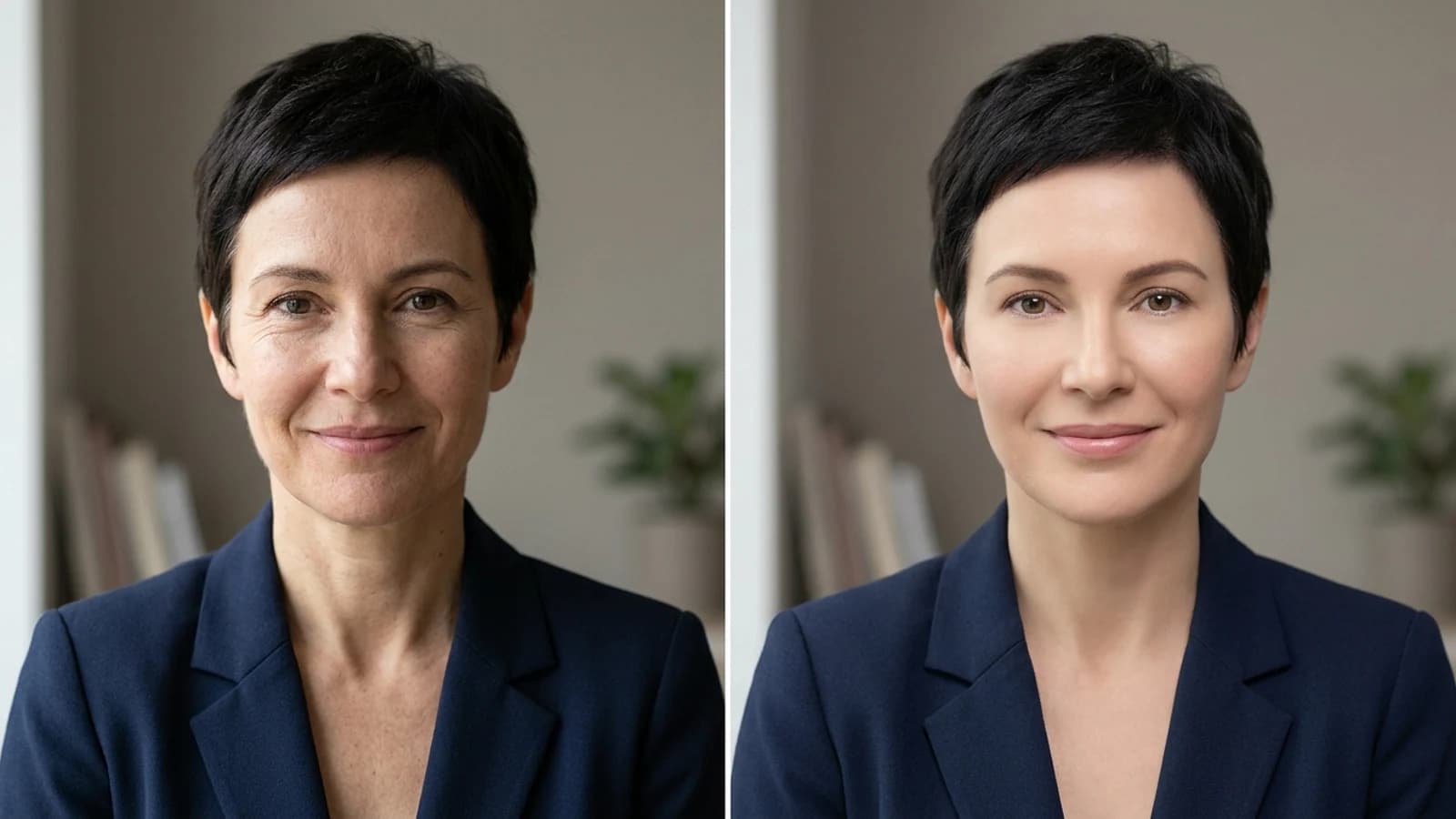
Picture two candidates with the same experience, the same skills and almost the same CV. Both use an AI-assisted profile photo. One looks like themselves on a good day. The other looks flawless but unfamiliar: smooth skin, perfect light, an expression borrowed from a catalog shoot.
Both pass the blind test. The difference shows up in the interview.
This article is not here to answer "should I use an AI headshot?" with a simple yes or no. It is here to explain 2026's most interesting contradiction: AI headshots win recruiters' blind preference tests, yet the same recruiters cool on a candidate once they realize AI was involved. These findings do not cancel each other out. Together they point to one conclusion: the problem is not the tool. It is how much the photo still looks like you.
Below you will find LinkedIn's actual rule, the research data, the giveaways that expose an AI photo, and a step-by-step workflow for a headshot that reads as natural. At the end there is a seven-point checklist to run before you publish.
Note: Platform rules and research data reflect publicly available sources as of 21 October 2026. LinkedIn's rules can change; check the current help page for a definitive answer.
#The same photo, two different outcomes
In 2026, an AI headshot is no longer a novelty. It is an ordinary career tool. Turning a handful of phone selfies into a professional-looking portrait takes minutes. That convenience brings a new question: what happens when a recruiter realizes the photo is AI?
Ringover's research gives two different answers. When recruiters do not know which image is AI, they prefer the AI versions over the real photos. Yet the same recruiters say their opinion of a candidate would suffer if they recognized an AI headshot.
That looks contradictory, but it is consistent human behavior: people reward a photo that looks good and punish the feeling of being misled. What matters is not the photo itself but the promise it makes. A good AI headshot says "this is me on a good day." A bad one says "I am actually someone else." Both are technically AI. One earns trust; the other loses it.
So the right question is: would the person across the interview table say "yes, that's them" when they meet you?
The phrase "blind test" here means a preference test, not a detection test. Recruiters were not told which photos were AI; they were simply asked which one they would choose. 76.5% chose an AI version. In other words, AI was liked without being noticed. That does not mean AI cannot be detected: in a separate part of the same study, recruiters identified it correctly only 39.5% of the time.
#The short answer: does LinkedIn allow AI headshots?
Yes — with conditions. LinkedIn's profile photo guidelines do not mention AI explicitly. Instead they set a broader, more useful standard:
Your profile photo must reflect your likeness.
The same page allows an illustration, caricature or other artistic rendering of yourself. LinkedIn is not saying "the photo must be real." It is saying "the photo must be yours and must represent you." That does not automatically ban an AI-generated headshot. But it does exclude images that make you unrecognizable, show someone else, or create a misleading impression.
#What LinkedIn may remove
LinkedIn says it may remove profile photos that consist solely of:
- Company logos
- Emojis
- Landscapes
- Animals
- Words or phrases
- Flags
- Childhood or baby photos
- Other people's likenesses: stock imagery, photos of celebrities and depictions of fictional characters
That list clarifies the heart of the AI debate: the issue is not how the image was made, but whose face appears in it. An AI-generated photo that looks like you is not treated differently from a real photo under the rule. A real photo showing someone else is still a violation.
#Three categories: allowed, risky, prohibited
| Category | Example | LinkedIn's position |
|---|---|---|
| Allowed | Lighting and resolution improvements, natural retouching, a likeness-preserving AI headshot, an illustration or caricature | Not a violation |
| Risky | Heavy skin smoothing, changing age or appearance, a filter that makes you unrecognizable | May be removed; likeness is what gets assessed |
| Prohibited | Someone else's face, stock imagery, a celebrity image, a fictional character, a logo/emoji/landscape | Removed |
The practical lesson: LinkedIn's enforcement relies largely on reports and visual review. There is no automatic "AI detected" badge and no mandatory AI label. The risk is therefore not "getting caught." It is having no defensible answer when someone notices. If you can say "that's me, just in good light," you are safe. If the honest answer is "that's me, ten years younger and fifteen kilos lighter," you are not.
#They win the blind test: what the Ringover study shows
The most comprehensive public research on this topic is Ringover's AI headshot study. Conducted in June 2024 with 1,087 US recruiters and updated in June 2026, it used a clever design: real photos and AI headshots from four price tiers were mixed together for five candidates, and recruiters were not told which was which.
#Key findings
| Metric | Result | What it means |
|---|---|---|
| Preference for AI headshots | 76.5% | When they did not know, recruiters chose AI versions over real photos |
| Top-tier AI preference | 42% (real: 23.5%) | The quality gap widens as the tool improves |
| AI detection rate | 39.5% | Recruiters guessed correctly in only about 4 of 10 cases |
| Confidence | 80% | 80% believed they had guessed accurately or very accurately |
| Backlash if noticed | 66% | A recognized AI photo creates a negative view of the candidate |
| Disclosure expectation | 88% | Recruiters believe AI use should be made clear |
| More inclined to interview | 74.4% | A good photo improves the odds of a conversation |
| Put off by a bad photo | 67.5% | A poor photo is a serious reason to reject |
#1. Preference rewards quality
The 76.5% figure does not mean "AI is always better." The strongest signal is the price-quality relationship: 42% preferred the top-tier AI headshot, while only 23.5% preferred the real photo. Free tools were the easiest to spot: 58.9% of participants flagged the free AI image as fake.
The takeaway is not "use AI." It is "use the version that preserves your identity, not the cheapest and fastest one." The difference shows up in skin texture, lighting consistency and facial likeness, not in the brand name.
#2. Detection is low, confidence is high
Recruiters correctly identified AI only 39.5% of the time. They guessed wrong 52.9% of the time; 7.6% said they could not tell. Yet 80% considered themselves accurate.
This is not just a story about experts being bad at the task. It has a more important implication: recruiters do not decide based on AI detection; they react to an intuitive sense of unease. When a photo feels "too flawless," they notice it as a human, not as a detector. That is why a guarantee that an image "passes AI detectors" is meaningless. The real task is to remove the inconsistency a person feels at first glance.
#3. The penalty comes from perceived intent
The 66% backlash is better read as a reaction to undisclosed AI use than to AI itself. The fact that 88% expect disclosure supports this. A candidate who says "I edited my photo with AI, but it is me" does not trigger the same response as one who says "this is me" while presenting a different appearance.
#4. A bad real photo is riskier than a good AI one
Perhaps the most practical finding: 67.5% of recruiters have been put off by a bad headshot. The main reasons were too stylized or posed (40.9%), poor photo quality (39.9%), too informal (35.6%) and filters or obvious editing (32.7%).
This shifts the question. Before "AI or real?", ask: is the photo professional? A blurry, old, careless selfie can do more damage than a well-made AI headshot.
Methodology caveat: The study surveyed US recruiters in 2024 and was updated in 2026. The sample is not global, and participants evaluated staged photo sets rather than real candidates. Treat the results as a strong directional signal, not as "every recruiter in the world thinks this."
#Why being noticed costs you
Noticing that a photo is AI is not a technical judgment. It is a social one. The recruiter's inner question is: "If they showed me someone else, what else are they hiding?"
That question undermines trust in three ways.
#1. The gap between promise and reality
A profile photo is a kind of upfront commitment: "this is the person who will show up." If the photo and the person in the interview differ noticeably, the candidate's other claims come under scrutiny. This is not a doubt about experience or competence; it is a doubt about honesty. And doubts about honesty are harder to repair.
#2. The backfire of "too flawless"
People find perfection attractive, but excessive perfection artificial. Poreless skin, a symmetrical face, the same expression in every frame — these are advertising aesthetics. Even if the recruiter does not consciously label them "AI," the subconscious signal can be "this person is hiding something."
It is no coincidence that "too flawless" (43.6%) and "too posed" (34.3%) scored so high. Recruiters may look for glitches, but what they are really looking for is naturalness.
#3. The collapse of consistency
One photo can be AI; the problem is when it does not match the other traces. Other LinkedIn photos, the team page on a company site, a conference video, a press photo — they should all show the same face. If your photo does not match the face you bring to a video call, no AI detector is needed. The inconsistency gives itself away.
#Why not being detected is not enough
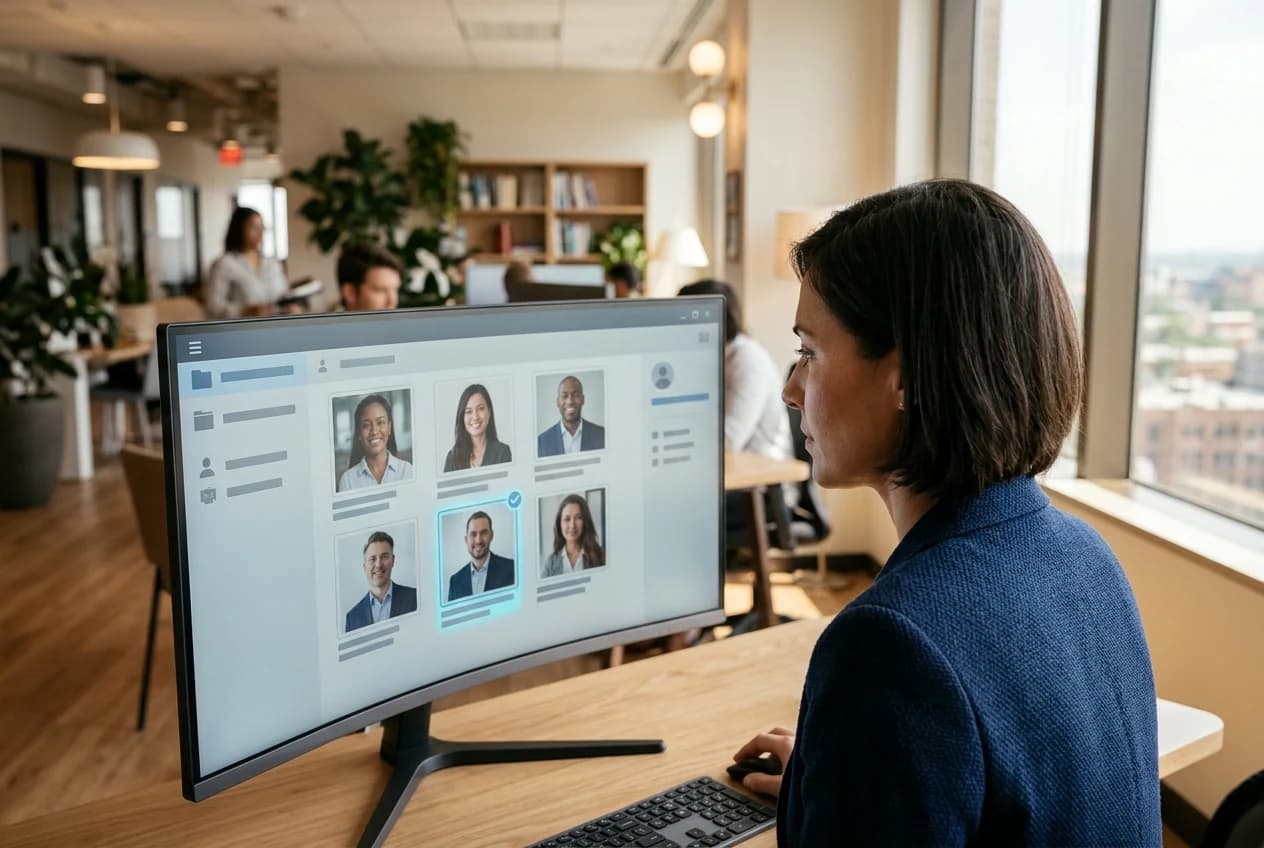
Because hiring does not look at a single moment. A recruiter may like the photo, open the CV, search for you on LinkedIn, check your company site, ask a mutual contact. One inconsistent frame can affect the whole file.
AI detection tools can create false confidence for the same reason. A tool saying "real" does not erase a person's sense that something is off. The goal is not to evade a detector. It is to create the consistency a human perceives at first glance.
#The 5 giveaways of an AI headshot
Ringover asked recruiters what gave an AI photo away. The answers work as a practical checklist:
| # | Signal | Rate | Where it shows | How to fix it |
|---|---|---|---|---|
| 1 | Glitching features | 54.8% | Ears, collars, jewelry, hair edges, teeth | Zoom to 200% and reject; do not accept edge artifacts |
| 2 | Overly flawless skin | 43.6% | Poreless skin, single-tone face, neck/face mismatch | Keep skin texture; reduce smoothing |
| 3 | Too posed | 34.3% | Frozen shoulders, catalog angle, one expression | Add micro-expression and slight asymmetry |
| 4 | Filters/obvious editing | 32.7% | HDR halo, blurred background edges, exaggerated eyes | Use natural depth of field and restrained retouching |
| 5 | Does not look like a real person | 23.3% | Proportion errors, age mismatch, "familiar but wrong" | Compare side by side with three real photos |
Data note: Four of the five rates (54.8%, 43.6%, 34.3% and 23.3%) come directly from the "what gave it away?" question. Filters/obvious editing (32.7%) comes from the study's separate "what puts you off a bad headshot?" question; it is included here as an additional quality signal.
#Glitching features: the strongest signal
Generative models are weakest in small, highly detailed areas. Earlobes, glasses arms, collar seams, earrings, the point where a strand of hair meets the background, the number of teeth. These are invisible at normal size, but obvious the moment a recruiter zooms in.
Practical test: Open the photo on your phone and zoom into four areas in turn: left ear, right ear, collar, hairline. If any of them is distorted, do not use the photo. A single flaw lowers the perceived quality of the whole image.
#Overly flawless skin: the most common mistake
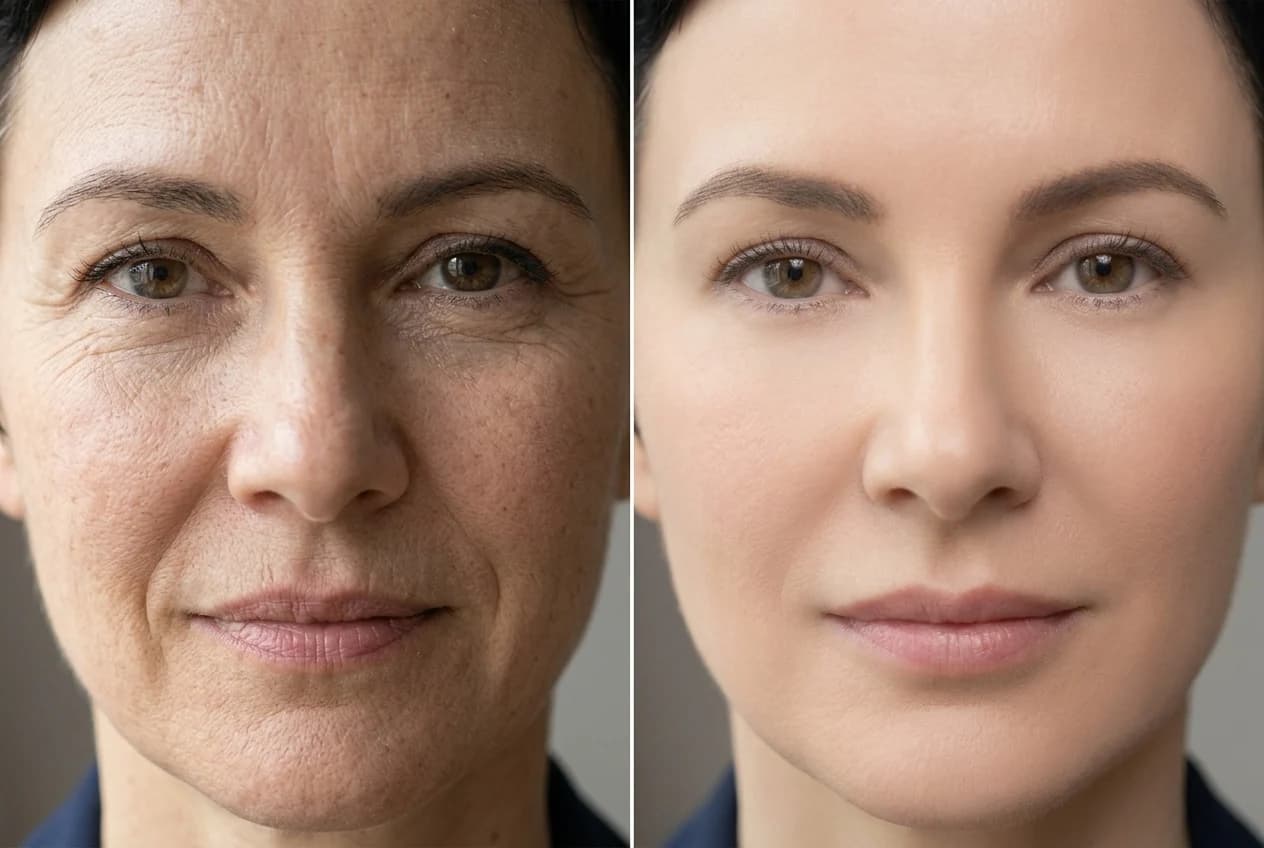
AI headshot tools tend to "beautify." Skin is smoothed, pores disappear, tone becomes uniform. The result looks impressive at first glance and plastic at second.
Real skin has subtle tonal variation that changes with the light. Forehead, nose and cheeks are not the same color. There is a natural transition between face and neck. When those details disappear, the photo does not look retouched. It looks artificial.
Practical test: Zoom to 200%. You should still see some texture and tonal variation. If you see none, the photo will lose trust even at studio quality.
#Too posed: the catalog shoot feeling
A good headshot looks like a moment that was caught. A bad AI headshot repeats the same angle, the same shoulder position and the same expression in every frame. This becomes obvious when you build a set.
Practical test: Put three photos of the same person side by side. If all three share the same angle, smile and shoulder line, the set looks artificial. A good set has slightly different angles, micro-expressions and light directions.
#6 traits of an AI photo that passes
You cannot "eliminate" AI from a headshot, and that is not the goal. The goal is a photo that, even if someone suspects AI, still says "this person represented themselves honestly." Six traits make that work.
#1. Identity fidelity
Placed beside three real photos, it should show the same person. Nose bridge, jawline, ear shape, hairline, brow spacing and distinguishing marks such as moles or scars should be preserved.
Looking similar is not enough; being recognizable is the bar. A friend should identify you within a second. A two-second hesitation can become a growing doubt in an interview.
#2. Skin texture
Skin is where photos give themselves away most often. Natural skin has subtle highlights and shadows that follow the direction of the light. When AI removes them, the face looks "masked."
A good headshot can look clean, but pores should not vanish entirely. Keep some texture, especially around the nose and cheeks.
#3. Lighting logic
If there is one light source, shadows should fall in one direction. If light comes from the left, the left side of the neck and collar should be lit too. A common AI error is a bright face with a dark neck, or two different catchlights in the eyes.
Practical test: Ask one question: "Where is the light coming from?" If the answer is unclear, the photo is not natural.
#4. Expression range
A good portrait looks like a captured moment. Slight asymmetry in the lips, natural creasing around the eyes, small differences in the brows. These are not flaws; they are evidence that you are human.
The most common AI expression is "slight smile, no teeth, looking at the camera." It looks professional once and artificial when repeated.
#5. Context fit
A LinkedIn photo should fit LinkedIn: simple background, business or smart-casual clothing, restrained accessories. A shot on a beach, in a nightclub or on a film set does not fit the professional context, AI or not.
AI tools sometimes produce dramatic backgrounds to look impressive. But a recruiter is not looking for impressive. They are looking for trustworthy.
#6. Resolution and sharpness
A blurry, low-resolution or heavily compressed photo devalues even the best AI output. On LinkedIn, the photo appears in a small circle; the face must be clear, the eyes sharp and the contrast measured.
#The difference between a giveaway and a natural look
| Trait | Giveaway | Natural |
|---|---|---|
| Skin | Poreless, single tone, plastic | Subtle texture and tonal variation |
| Light | Bright face, dark neck; inconsistent shadow | Single direction, consistent shadow |
| Expression | Frozen, catalog smile | Slight asymmetry, caught-in-the-moment feel |
| Hair/edges | Melting strands, distorted collar | Clean edges, natural texture |
| Background | Over-blurred or artificial depth | Measured depth of field |
| Likeness | "Familiar but wrong" | "Yes, that's them" |
All six do not have to be perfect at once. But identity fidelity and skin texture are non-negotiable. If those two are weak, the other four cannot save the photo.
#Why Nothron works differently
Most AI headshot tools focus on producing a photo that "looks better." The natural consequence is that the face drifts toward an average beauty ideal. The result may be impressive, but it shows an ideal, not you.
Nothron's pipeline was built with a different priority: identity first, aesthetics second.
#Identity vector and similarity threshold
The system extracts a 512-dimensional identity vector from your uploaded photos using Insight Face. Every generated candidate is compared against that vector and rejected if cosine similarity falls below a set threshold. This is a likeness-preserving approach, not face swapping.
The critical point: similarity is not a check at the end of the process; it is part of the process. The system keeps outputs that look like you, not just outputs that look good.
#Personalization and a large generation pool
Nothron learns details specific to your face through DreamBooth and LoRA-based personalization, then generates from a pool of 78,125 prompt combinations. The purpose of that pool is not random variety, but keeping the same identity consistent across different lights, angles and contexts.
The resulting set resembles a person on different days more than one "perfect" photo. That also helps it match your other LinkedIn photos and how you look on a video call.
#Why this is not about evading detection
Because the goal is not to fool a detector. The goal is for the photo to represent you accurately. When a person looks at a photo, they ask "who is this?" before they ask "is this AI?" If the answer is you, the AI debate largely loses its point.
You can try this approach with Nothron Neural Headshot Generator. It builds a natural set from your existing selfies; Neural Engine improves resolution and sharpness, while Natural Glow balances skin tone without overdoing it.
For a deeper technical look, Nothron's AI architecture article explains the pipeline in detail.
#Step by step: a natural LinkedIn headshot
A good AI headshot starts with the right input and the right rejection criteria. These five steps require no technical knowledge.
#1. Choose your input photos carefully
This is the most important step. Your input photos set the ceiling for the output.
- Use 6–10 photos; a single selfie is not enough.
- Choose photos taken within the last 12 months.
- Include different lighting: window light, outdoors, soft indoor light.
- No filters, heavy retouching or beauty mode.
- If you wear glasses, include one shot with and one without.
- Pick frames where your face is clear, evenly lit and high-resolution.
Avoid: group photos, heavily shadowed shots, photos where your face is less than 50% visible, and old images that show a different look.
#2. Generate and ask for variations
Do not accept a single output. Ask for variations in lighting, background and expression. Put at least 8–10 candidates side by side. This makes selection easier and helps you avoid the "one identical face" trap.
#3. Run the identity check
Place each candidate beside three real photos of yourself. Ask:
- Are the nose bridge and jawline the same?
- Are the ear shape and hairline consistent?
- Are the face width and proportions right?
- Does the expression resemble your natural expression?
- Would someone identify you within a second?
If you answer "no" to more than one, reject the photo. No matter how good it looks, a photo that misses your identity will not work.
#4. Check texture and lighting
Zoom into your top 2–3 options at 200%:
- Is there skin texture, or does it look plastic?
- Do the eyes and teeth look natural?
- Is the light coming from one direction, with consistent shadows?
- Are the hair edges and collar seams clean?
- Does the background depth look natural?
Reject anything that fails. One flawed frame lowers the perceived quality of the whole profile.
#5. Upload it the right way
- Crop the photo square; LinkedIn will display it in a circle.
- Your face should fill about 60% of the frame — not too far, not too close.
- Keep your eye line in the upper third.
- Use a simple, non-distracting background.
- Check it on desktop and mobile after uploading; the face must still be clear in the small circle.
One more step: add at least one real, recent, casual photo to your profile. It bridges the gap between your AI headshot and how you actually look.

#When you should not use AI
An AI headshot is a safe tool in most professional contexts. In some situations, the risk outweighs the benefit.
#1. When the photo requires identity verification
Some platforms and institutions verify that a profile photo belongs to a real, live person. Using an AI-generated image in that process can cause a verification mismatch and account restrictions. Use a real photo instead.
#2. When it materially changes your appearance
A photo that significantly changes your age, weight, skin tone or facial structure is not an improvement; it is a misrepresentation. In a hiring process, that invites questions about honesty. The goal should be to show how you look on a good day.
#3. When your field is built on trust and identity
In law, healthcare, finance, security and the public sector, professional representation requires more than visual consistency. A real studio photo or corporate shoot may be the safer choice.
#4. When the context is misleading
If the photo puts you in a place you have never been, a role you do not hold or a title you do not have, AI use is the smallest part of the problem. A LinkedIn profile is a shop window; if the scene is not true, even the best photo cannot fix it.
#The EU AI Act and transparency: what changed in 2026?
The EU AI Act's transparency rules apply from 2 August 2026. Article 50 creates two relevant obligations:
- For providers: mark the outputs of generative AI systems in a machine-readable format and make them detectable as AI-generated.
- For deployers: clearly disclose deepfake images, audio or video.
There is an important exception: uses that perform only an assistive function for standard editing and do not substantially alter the input or its meaning fall outside the scope. Improving a photo's lighting, resolution or composition does not, on its own, create a deepfake obligation.
Practical reading: a profile photo that represents you accurately and only improves quality is unlikely to fall within the deepfake definition, though this depends on the specific use. An image that shows a different appearance or implies a context that does not exist carries more risk. This is not legal advice; consult a professional for your situation.
One more distinction: Article 50's obligations are aimed primarily at providers and at deployers publishing deepfakes. An individual publishing a profile photo on LinkedIn does not automatically fall into scope. Still, the principle of transparency is a useful compass: if the photo misrepresents you, whether it is AI is secondary.
#The 7-point pre-publish checklist
Run this list before uploading. Every answer should be "yes."
| # | Check | Pass criteria |
|---|---|---|
| 1 | Likeness | Side by side with three real photos, it is clearly the same person |
| 2 | Recognition test | Someone who knows you identifies you within a second, with no hint |
| 3 | Skin texture | At 200% there is no poreless or plastic look |
| 4 | Lighting consistency | Shadows fall in the same direction on face, neck and background |
| 5 | Edge detail | No distortion in ears, hair edges, collar or jewelry |
| 6 | Context | Clothing, background and expression fit a LinkedIn context |
| 7 | Consistency | It does not conflict with your other photos or your overall appearance |
If any answer is "no," do not upload. Generating a new variation is always easier than defending a flawed photo.
#Frequently asked questions
#Is using an AI headshot on LinkedIn allowed?
Yes, with conditions. LinkedIn does not ban AI-generated photos; it requires your profile photo to reflect your likeness. Illustrations, caricatures and artistic renderings of yourself are allowed. Photos showing someone else, stock imagery, celebrities or fictional characters can be removed. What matters is not the tool you used, but whether the photo honestly represents you.
#Can recruiters tell an AI headshot?
Usually not. In Ringover's survey of 1,087 US recruiters, participants correctly identified AI headshots only 39.5% of the time — while 80% believed their guesses were accurate or very accurate. Recruiters are not reliable AI detectors. But when they do notice, the reaction is strong: 66% said they would be put off a candidate.
#Do I have to disclose that I used AI?
LinkedIn does not require a visible AI label, but 88% of recruiters in the study said AI use should be made clear. The practical line: if the photo faithfully represents you and only lighting, resolution or composition were adjusted, a separate disclosure is not necessary. If it changes your age, appearance or professional context in a misleading way, disclose it or do not use it.
#How can I tell whether an AI headshot still looks like me?
Place it beside three real photos and compare only the face: nose bridge, jawline, ear shape, hairline, brow spacing, moles and scars. Then zoom to 200% and check skin texture, eyes and teeth. Finally, run the recognition test: someone who knows you well should identify you within a second, without any hint. Any hesitation means the likeness is not strong enough.
#What is the most common AI headshot giveaway?
Glitching features rank first: 54.8% of recruiters in Ringover's study named them. Ears, collars, jewelry, hair edges and teeth alignment are the usual culprits. Next comes overly flawless skin (43.6%) — poreless, single-tone, plastic-looking. Third is an over-posed, catalog-style expression (34.3%). Fixing these three does more for perceived realism than any other adjustment.
#Will an AI headshot hurt my chances of an interview?
A natural headshot that looks like you will not. In the study, 74.4% of recruiters were more inclined to interview candidates with a headshot. The risk appears when the photo is poor or gets noticed: 67.5% were put off by a bad headshot and 66% by one they recognized as AI. The question is not whether to use AI, but whether the photo actually looks like you.
#Can I mix real and AI photos?
Yes — that is the safest approach. Your profile photo can be a natural AI headshot while experience, certifications and project sections use real photos. Consistency across images builds more trust than one perfect shot. If possible, keep at least one real, recent, casual photo on your profile so the transition from photo to video call feels natural.
#How does the EU AI Act affect profile photos?
The EU AI Act's transparency rules apply from 2 August 2026. Article 50 requires deepfake content to be disclosed and generative systems to mark outputs in a machine-readable way. Standard editing that does not substantially alter the input is exempt. A faithful profile photo with only lighting and quality improvements is unlikely to fall within the deepfake definition, but this depends on the specific use. This is not legal advice.
#Conclusion
The 2026 data paints a clear picture: AI headshots win recruiters over when they are done well, and lose them when they are done badly or get noticed. What separates the two is not the brand of the tool. It is how much the photo looks like you.
So ask three questions before choosing your LinkedIn photo:
- Does this photo identify me within a second?
- Would the person I meet say "yes, that's them"?
- If I had to defend this photo, would I have an honest answer?
If you can say yes to all three, the fact that AI was involved is secondary. Because what a recruiter is looking for is not perfection. It is consistency.
At Nothron, we built the workflow around exactly that principle: identity first, aesthetics second. To create a natural, professional headshot from your existing photos, visit Nothron Neural Headshot Generator. Your first photo is free; no card required.
#Related guides
- Why Your LinkedIn Profile Photo Matters and How AI Can Help
- Professional Headshot Guide by Profession 2026
- The 5 Best AI Headshot Generators of 2026
- Nothron Neural Headshot Generator Advantages
- Inside Nothron's AI Headshot Architecture: Insight Face and LoRA
- Tinder Shadowban Test and Photo Audit 2026
Legal note: This content is for informational purposes and is not affiliated with LinkedIn. LinkedIn's rules may change by country and over time; check the current help pages for definitive guidance. The section on the EU AI Act is not legal advice; consult a professional for your specific situation.
Nothron Team
The Nothron team turns experience in AI, computer vision and professional photography into a photo studio that anyone can use.
Related articles
Should You Smile in Your Headshot? What the Research Actually Says (2026)
Oct 25, 2026 · 26 min read
Professional Headshot Cost in 2026: What You Really Pay in 7 Countries
Oct 24, 2026 · 22 min read
How to Take Photos for an AI Headshot Generator: The 10–15 Photo Checklist (2026)
Oct 23, 2026 · 27 min read